

Find results faster
Use configurable navigation, full-text queries and metadata filters instead of relying on filenames or personal knowledge.
PEAK TEST DATA WORKPLACE · ENGINEERING SELF - SERVICE
WHY IT MATTERS
Test teams need more than access to a folder or database. They need to quickly identify relevant results, verify the technical context and make datasets available for the next step.
Use configurable navigation, full-text queries and metadata filters instead of relying on filenames or personal knowledge.
Review test objects, setups, operating parameters, measurement systems and sensors alongside results.
Preview signals and media in the browser to identify the right measurements and spot obvious differences early.
Collect data for further processing and start connected recurring evaluation, export or reporting workflows.
INSIDE THE PRODUCT
Explore the features your teams use day to day. Peak Test Data Workplace provides a multilingual user interface for internationally distributed engineering teams. The screenshots below show the German-language interface.
Four original Workplace views show how engineers move from discovering a dataset to evaluating signals, inspecting associated media and monitoring automated processes.
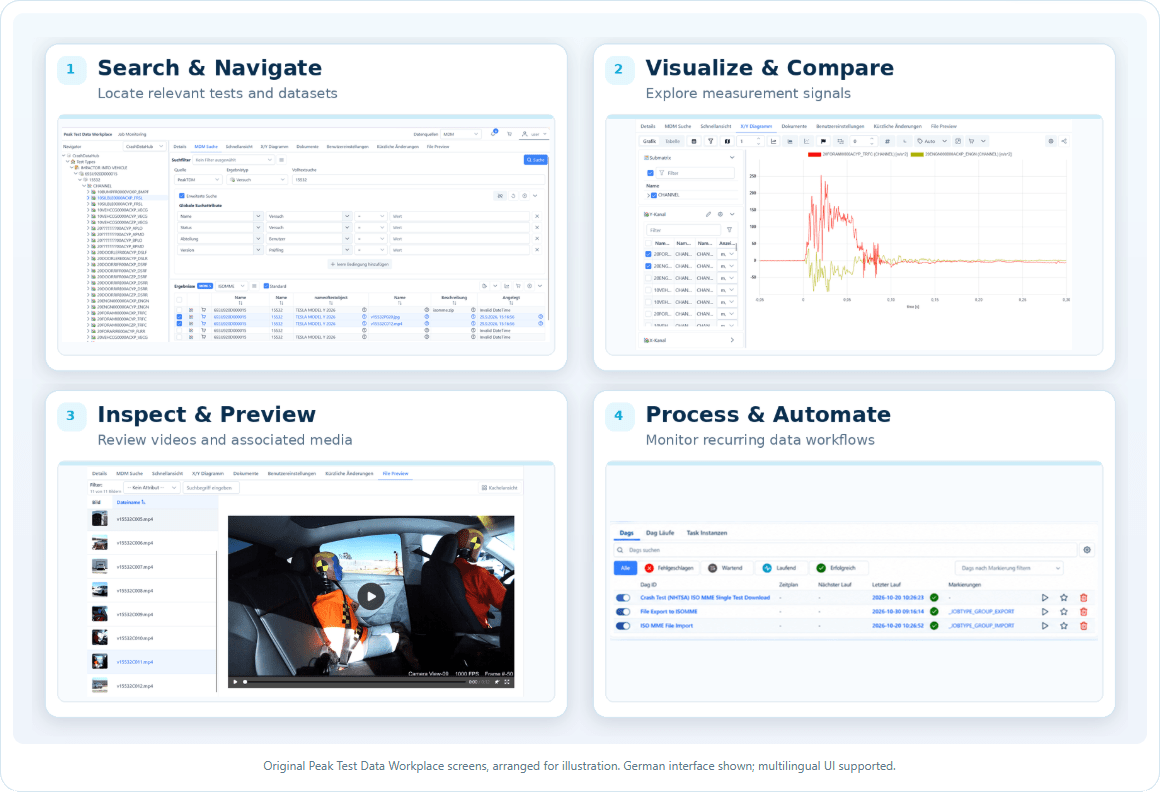
Browse technical hierarchies, combine full-text and attribute-based criteria, and inspect a configurable list of matching datasets.
Review signals in a configurable X/Y viewer and perform a first comparison across selected measurements.
Preview attached images and recordings without leaving the data exploration experience.
Monitor the execution of configured import, export and evaluation tasks.
CAPABILITIES BUILT AROUND ENGINEERS
Peak Test Data Workplace combines the essential self-service functions of professional Test Data Management with configurable presentation of engineering context.
Browse by different project, test field, test object and location hierarchies. Dynamic Node Providers deliver navigation labels, icons, states and routes, with role-aware visibility.
Search for tests, measurements, channels and any searchable object attributes defined in the metadata model. Save useful search and navigation configurations.
Configure result columns and inspect descriptive data for projects, tests, steps and measurements — including sensors, setup, operating conditions and instrumentation.
Visualize individual measurement channels or compare signals from multiple measurements for a fast first assessment, before deeper specialist analysis.
Upload and download experiment descriptions, setup instructions, control files, procedures, test reports and other associated documents.
Preview test images and recordings in their measurement context and upload or download related media files.
Collect selected datasets and hand them over to connected data exports, analysis tools or post-processing workflows.
Start recurring processing jobs manually or through configured automation, including analytical evaluations, imports, exports and reporting.
FEDERATED DATA EXPLORATION
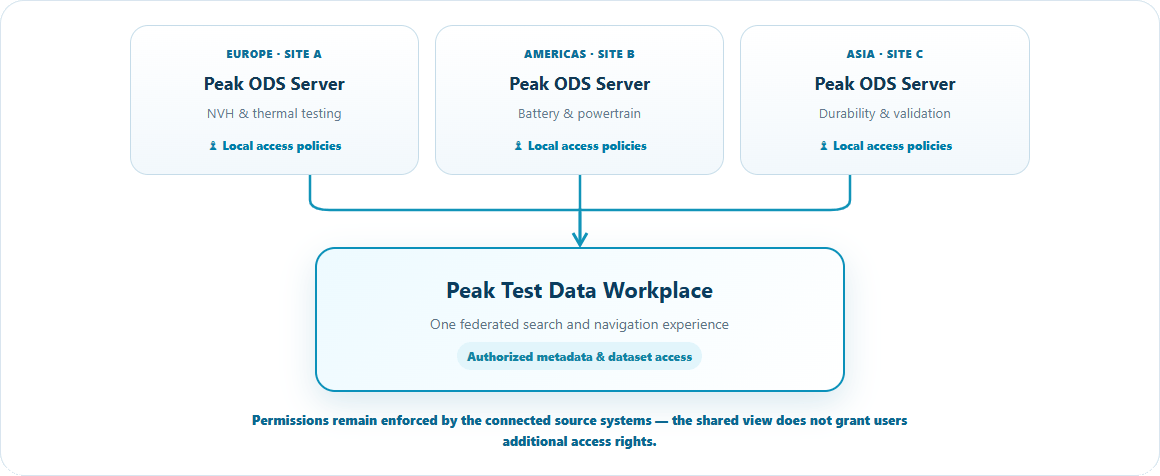
Engineering data is often distributed across sites, organizational units and test domains. Peak Test Data Workplace can extend its navigation and queries across a federation of Peak ODS Servers, allowing authorized users to explore datasets through a shared interface while respecting existing permissions.
Explore across sites
Discover relevant test data without manually switching between separate local environments.
Retain domain context
Navigate different data models and engineering disciplines through a shared experience.
Preserve governance
Federated discovery is subject to the permissions already defined for connected data sources.
FROM DISCOVERY TO ACTION
Use a navigational perspective or targeted search to find matching tests, measurements or channels.
Inspect metadata, compare signals and preview related documentation or media before selecting data.
Add datasets to your basket, export selected content or initiate configured analytical and reporting jobs.
FLEXIBLE ENGINEERING INFORMATION
The underlying ASAM ODS data models can describe domain-specific tests, attributes, quantities and units. Depending on configuration, authorized users can maintain data catalogs, templates and descriptive metadata — helping teams keep their technical information usable as requirements evolve.
ANSWERS BEFORE YOU GET STARTES
No. Workplace supports discovery, inspection and initial assessment. Existing analysis environments can remain in use through the interfaces of the underlying PeakTDM platform.
Yes. Navigation perspectives and Node Providers can organize objects by project, test field, test object, site and other criteria defined by the data model and configuration.
Yes. The Workplace supports federated exploration of multiple Peak ODS Servers. Actual availability and returned results are subject to connectivity, configuration and each source's access controls.
No. It provides fast browser-based signal previews and comparisons. Detailed discipline-specific evaluations can continue in connected specialist tools.
Show us your test domains, data sources and existing tools. We'll demonstrate how Peak Test Data Workplace could fit your engineering environment.
One data foundation. Connected engineering workflows.
Discover the components and technologies that complement the Workplace and help you build a complete, standards-based test data environment.
Peak Test Data Manager
Discover the full engineering data management platform behind the Workplace.
Peak ODS-Server
Store and access measurement data through open ASAM ODS models and standardized APIs.
Peak Data Transfer Tool
Automate import, cleansing and metadata enrichment from different test systems and file formats.
Peak Permission Manager
Control access to sensitive technical data using managed permissions at various levels.
What is ASAM ODS?
The ASAM ODS standard defines APIs and formats for storing and retrieving test and measurement data
What is openMDM?
openMDM® is an open source framework for developing applications for measurement data management systems.
Informed decision-making with data analysis
Overview of data analytics and ways to connect the right analytics tools to work with Peak Test Data Manager.
